Known Hosts
StormTunnel → Settings (Cmd+,) → Known Hosts tab
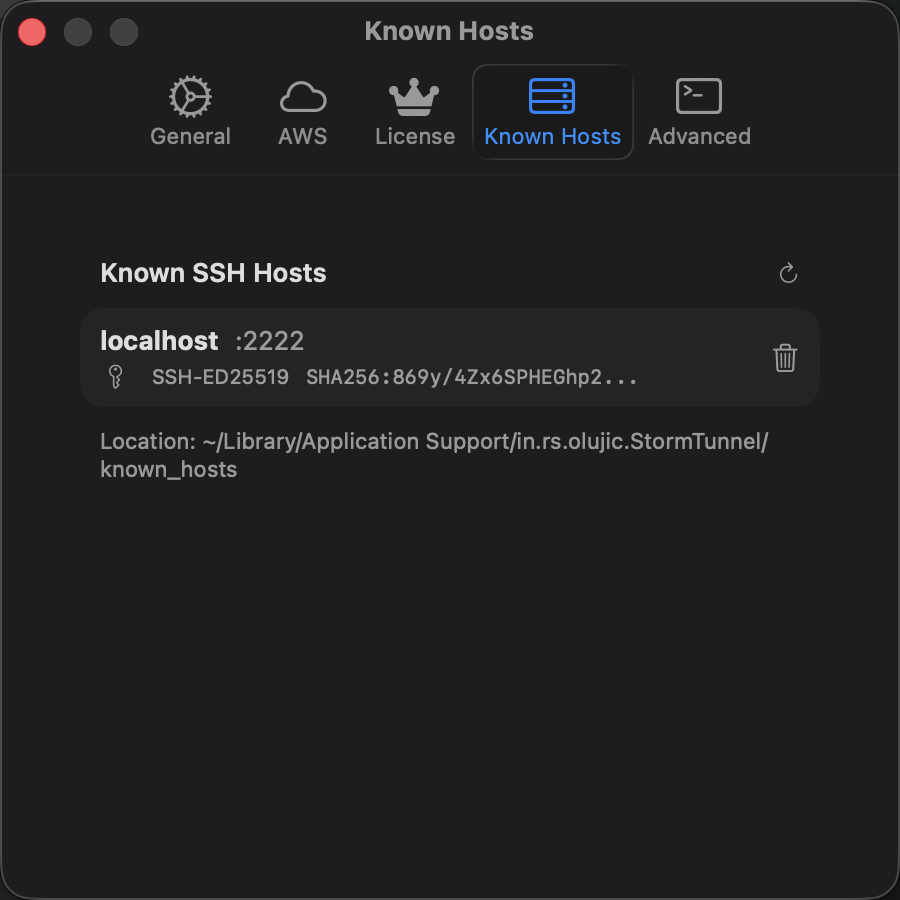
StormTunnel records each server's SSH host key and verifies it on future connections. This prevents man-in-the-middle attacks.
Host Key Types
| Type | Security | Notes |
|---|---|---|
| ED25519 | Excellent | Modern, recommended |
| ECDSA | Good | Modern alternative |
| RSA | Good | Legacy, widely compatible |
| DSA | Weak | Avoid if possible |
Entry Fields
Each known host entry displays:
| Field | Description |
|---|---|
| Host | Server address and port |
| Key Type | ED25519, RSA, etc. |
| Fingerprint | SHA256 hash, shortened |
Click Reload to read changes to the trust file from disk.
First Connection
When you connect to a new server, StormTunnel asks Accept New SSH Host Keys? Compare the displayed fingerprints with the ones your server administrator provides. If they match, click Accept. Click Reject to cancel the connection. Future connections to that server skip the prompt.
Remove a Key
- Find the server in the list
- Click its trash button or choose Delete… from its context menu
- Confirm deletion
Deletion removes all stored keys for that host and port locally. The next connection to that server will ask you to verify again.
Host Key Changes
When a server presents a different key than the one stored, StormTunnel shows Security Alert: Host Key Changed with the expected and received fingerprints. This can mean the server admin rotated keys or the server was reinstalled -- both normal. It can also indicate a man-in-the-middle attack.
To resolve a key change:
- Contact your server administrator and ask if they changed SSH keys
- If confirmed, get the new fingerprint and verify it matches
- Click Acknowledge & Update in the alert, or remove the old key here and accept the new one on the next connection (Reject Connection keeps the stored key and cancels)
- If the change is not confirmed, do not connect and report it to your security team
Storage
Native SSH (NIO), CLI SSH, and Known Hosts settings share one trust file:
This file contains only public keys. Do not sync it to public cloud storage.
CLI-only host trust saved by older versions needs re-approval. On the next connection, verify the displayed fingerprint with your administrator before accepting.