Skip to content

General SettingsΒΆ

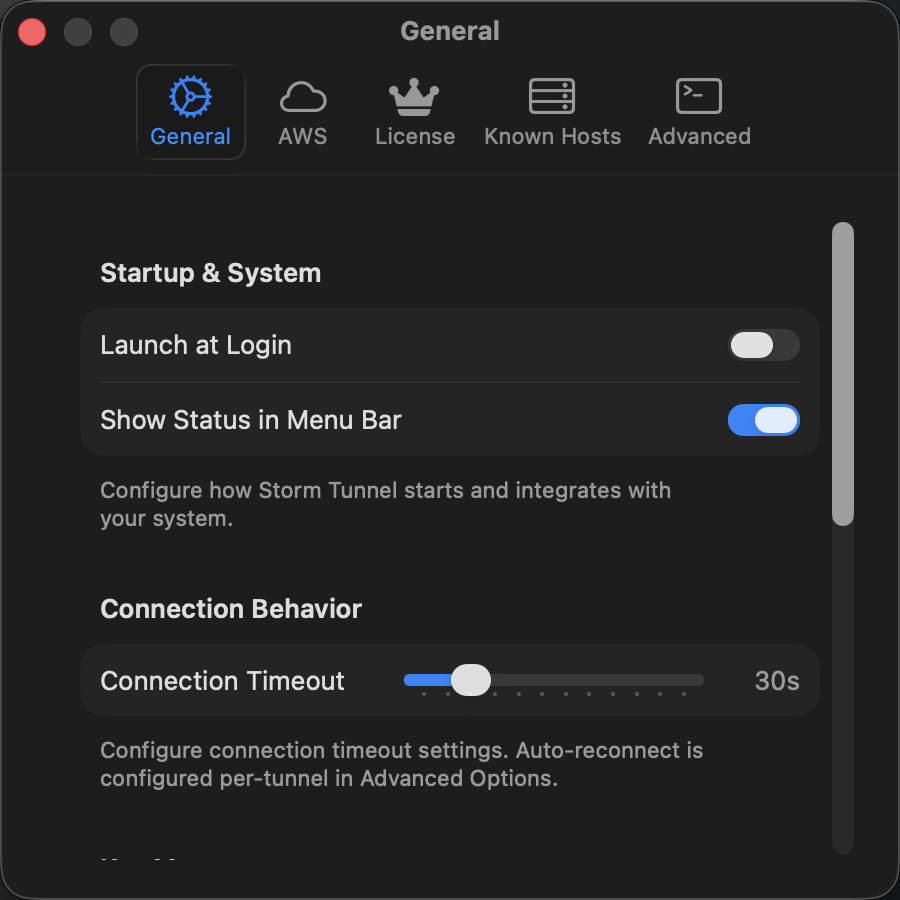
General Settings Window

The General Settings tab provides basic application configuration options that control StormTunnel's startup behavior, connection settings, and notification preferences.

πŸš€ Startup & SystemΒΆ

Launch at LoginΒΆ

  • Control: Toggle switch
  • Default: Disabled
  • Function: Automatically starts StormTunnel when the user logs into macOS
  • Implementation: Uses LaunchAtLoginManager with macOS Login Items API
  • Security: Requires user permission to modify login items

Show Status in Menu BarΒΆ

  • Control: Toggle switch
  • Default: Enabled
  • Function: Displays connection status and quick actions in the macOS menu bar
  • Features:
    • Connection status indicator (active/inactive/error)
    • Quick access to common actions
    • Connection summary information
  • Implementation: Managed by MenuBarManager with immediate visibility updates

πŸ”Œ Connection BehaviorΒΆ

Connection TimeoutΒΆ

  • Control: Slider with value display
  • Range: 10-120 seconds (in 10-second increments)
  • Default: 30 seconds
  • Function: Maximum time to wait when establishing SSH connections
  • Applies to: All tunnel types (Standard SSH, AWS Session Manager, Dynamic Port Forwarding)
  • Technical Details:
    // Timeout configuration in SSH connection
    let timeoutInterval = TimeInterval(connectionTimeout)
    sshProcess.timeout = timeoutInterval
    
  • Performance Impact:
    • Lower values (10-20s): Faster failure detection but may timeout on slow connections
    • Higher values (60-120s): Better for unreliable networks but slower error reporting

πŸ” Key ManagementΒΆ

Show Stale Validation WarningsΒΆ

  • Control: Toggle switch
  • Default: Enabled
  • Function: Warn users about SSH keys that haven't been validated in over 30 days
  • Security Purpose: Encourages regular key validation and rotation
  • Warning Criteria:
    • Key exists but hasn't been used for validation
    • Last validation date > 30 days ago
    • Key appears in SSH configuration but validation status is unknown
  • Implementation: Tracked in SSHKey model with lastValidated timestamp

πŸ”” NotificationsΒΆ

StormTunnel uses an intelligent notification system that routes messages appropriately based on app state and user preferences.

Prefer Toasts When App is ActiveΒΆ

  • Control: Toggle switch
  • Default: Enabled
  • Function: Show in-app toast notifications when StormTunnel window is visible
  • Behavior:
    • Enabled: Toasts appear in app window for non-critical notifications
    • Disabled: All notifications go to system notification center
  • Toast Features:
    • Auto-dismiss after configurable duration
    • Non-intrusive overlay positioning
    • Action buttons for immediate response
    • Stacking for multiple notifications

Show System NotificationsΒΆ

  • Control: Toggle switch
  • Default: Enabled
  • Function: Display macOS notification center banners when app is in background
  • System Integration:
    • Uses UNUserNotificationCenter for native notifications
    • Respects macOS notification preferences
    • Works with Do Not Disturb mode
  • Background Detection: Automatically detects when app loses focus

Always Show Critical Errors as System NotificationsΒΆ

  • Control: Toggle switch
  • Default: Enabled
  • Function: Forces critical errors to use system notifications regardless of app state
  • Dependency: Requires "Show system notifications" to be enabled
  • Critical Error Types:
    • Authentication failures
    • Connection security warnings
    • License expiration alerts
    • System-level errors
  • Behavior: Shows both toast (if app active) and system notification

Enable Notification SoundsΒΆ

  • Control: Toggle switch
  • Default: Enabled
  • Function: Play sound effects for notifications and alerts
  • Sound Types:
    • Connection Success: Positive chime
    • Connection Error: Warning tone
    • Critical Error: Alert sound
    • License Expiry: Reminder chime
  • System Integration: Uses NSSound with respect to system volume settings

🎯 Notification Routing Logic¢

The notification system uses intelligent routing based on multiple factors:

Decision MatrixΒΆ

App State Toast Preference System Notification Result
Active Enabled Enabled Toast only (non-critical), System + Toast (critical)
Active Enabled Disabled Toast only
Active Disabled Enabled System only
Active Disabled Disabled No notifications
Background Any Enabled System only
Background Any Disabled No notifications

Implementation DetailsΒΆ

// Notification routing logic
func routeNotification(_ message: UserMessage) {
    let isAppActive = NSApplication.shared.isActive
    let preferToasts = preferToastsWhenActive
    let showSystem = showSystemNotifications
    let isCritical = message.severity == .critical

    let showToast = isAppActive && preferToasts && !isCritical
    let showSystemNotification = (!isAppActive || !preferToasts || isCritical) && showSystem

    if showToast {
        ToastManager.shared.show(message)
    }

    if showSystemNotification {
        SystemNotificationService.shared.show(message)
    }
}

πŸ”§ Technical ImplementationΒΆ

Settings PersistenceΒΆ

All General Settings are stored using UserDefaultsManager with immediate persistence:

// Launch at Login
UserDefaultsManager.shared.set(isLaunchAtLoginEnabled, forKey: "launchAtLogin")

// Menu Bar Status
UserDefaultsManager.shared.set(showStatusInMenuBar, forKey: "ui.showStatusInMenuBar")

// Connection Timeout
UserDefaultsManager.shared.set(Int(connectionTimeout), forKey: "settings.connectionTimeout")

// Notification Preferences
UserDefaultsManager.shared.set(preferToastsWhenActive, forKey: "preferToastsWhenActive")
UserDefaultsManager.shared.set(showSystemNotifications, forKey: "showSystemNotifications")
UserDefaultsManager.shared.set(alwaysShowCriticalAsSystem, forKey: "alwaysShowCriticalAsSystem")
UserDefaultsManager.shared.set(enableNotificationSounds, forKey: "notifications.enableSounds")

Real-time UpdatesΒΆ

Settings changes take effect immediately:

  • Menu Bar: Visibility updates instantly when toggled
  • Connection Timeout: Applies to new connections immediately
  • Notifications: Routing preferences update in real-time
  • Launch at Login: Modifies system login items immediately

Default ValuesΒΆ

First-time users get sensible defaults:

// Default configuration for new installations
struct GeneralSettingsDefaults {
    static let launchAtLogin = false
    static let showStatusInMenuBar = true
    static let connectionTimeout = 30.0
    static let preferToastsWhenActive = true
    static let showSystemNotifications = true
    static let alwaysShowCriticalAsSystem = true
    static let enableNotificationSounds = true
    static let showStaleValidationWarnings = true
}

🎨 User Experience¢

Interface DesignΒΆ

  • Grouped Form Style: Uses macOS native form styling
  • Help Text: Contextual help available for all controls
  • Section Headers: Clear categorization of settings
  • Footer Text: Explanatory text for each section

AccessibilityΒΆ

  • VoiceOver Support: All controls properly labeled
  • Keyboard Navigation: Full tab navigation support
  • High Contrast: Respects system contrast settings
  • Reduced Motion: Animations respect accessibility preferences

Performance ConsiderationsΒΆ

  • Immediate Persistence: Settings save instantly without UI delay
  • Efficient Updates: Only affected services receive change notifications
  • Memory Management: Lightweight property observers prevent memory leaks

πŸ”’ Security & PrivacyΒΆ

Data ProtectionΒΆ

  • Local Storage: All settings stored locally in UserDefaults
  • No Telemetry: General settings don't transmit any data
  • Permission Respect: All system integrations require explicit user permission

Privacy FeaturesΒΆ

  • Notification Control: Users control exactly what notifications they see
  • Background Behavior: Clear indication of when app works in background
  • Key Validation: Optional stale key warnings enhance security awareness

Last Updated: December 17, 2025 Implementation Files: GeneralSettingsView.swift, SettingsViewModel.swift