Pricing & Plans
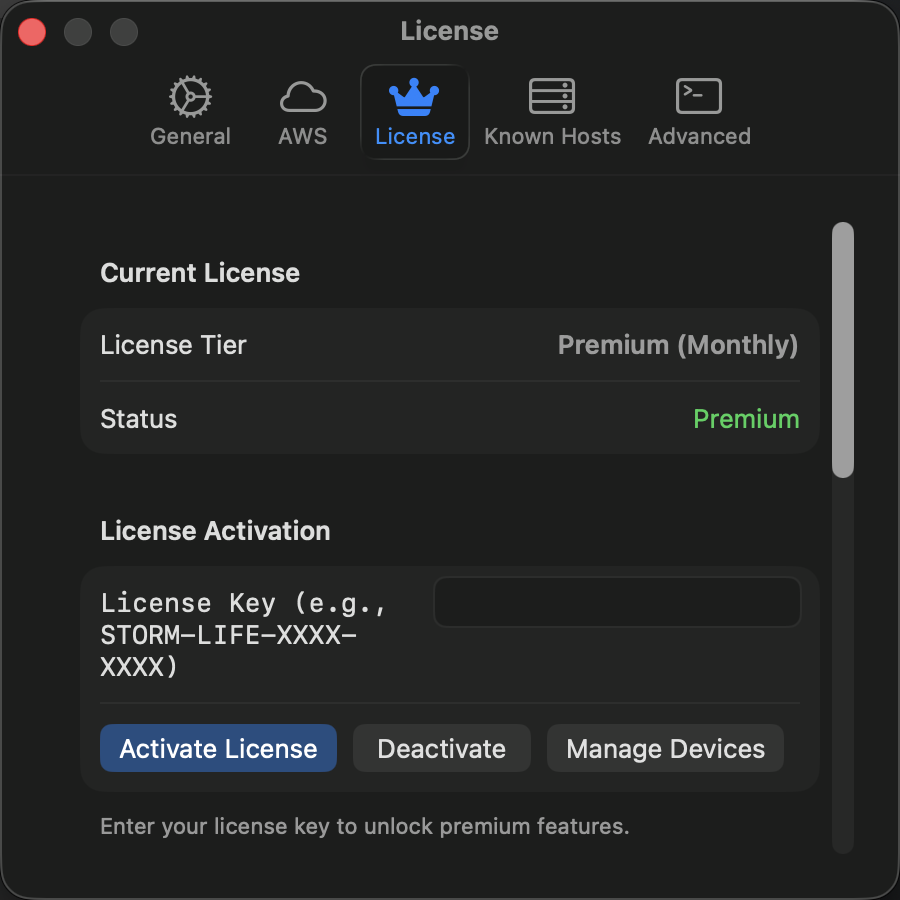
StormTunnel has two plans: Free for single-tunnel use and Premium for unlimited tunnels and AWS support.
Plans
Free
- 1 active tunnel at a time
- Unlimited saved tunnel configurations
- SSH key management with macOS Keychain
- Menu bar access
- Desktop notifications
- Last 5 connection events in history
- Export tunnels as plain JSON
Premium
Everything in Free, plus:
- Unlimited active tunnels
- AWS Session Manager
- Full connection history
- Encrypted exports (AES-256)
- Auto-reconnect with retry logic
- Priority support (48-hour email response)
- Early access to new features
Pricing:
- $5/month -- cancel anytime
- $39 lifetime -- one payment, covers all v1.x updates
Feature Comparison
| Feature | Free | Premium |
|---|---|---|
| Active tunnels at once | 1 | Unlimited |
| Tunnel configurations | Unlimited | Unlimited |
| SSH key management | Yes | Yes |
| Menu bar integration | Yes | Yes |
| AWS Session Manager | No | Yes |
| Connection history | Last 5 | Unlimited |
| Export encryption | No | Yes |
| Auto-reconnect | No | Yes |
| Priority support | No | Yes |
Upgrading
In-App
- Go to Settings -> License
- Click View Plans & Upgrade
- Choose monthly or lifetime
- Complete checkout in your browser
- Premium activates immediately
Website
- Visit storm-tunnel.app/pricing
- Choose your plan and complete purchase
- Check email for your license key
- In the app: Settings -> License -> Activate
- Enter your license key
Managing Your License
Check Your Current Plan
Settings -> License shows your current plan, license expiration (if monthly), and available features.
Moving to a New Mac
- On old Mac: Settings -> License -> Deactivate
- On new Mac: Install StormTunnel
- Settings -> License -> Activate
- Enter your license key
You can use Premium on up to 2 Macs at once.
Cancel Subscription
Monthly subscribers:
- Visit your customer portal (link in purchase email)
- Click Cancel Subscription
- Premium stays active until the current period ends
Lifetime licenses never expire for v1.x updates.
Free Plan Behavior
You can configure everything on the Free plan. Upgrade prompts only appear when you try to:
- Start a second tunnel while one is running
- Connect via AWS Session Manager
- Enable auto-reconnect
Visual indicators on the Free plan:
- Lock icon on AWS tunnels
- "Premium" badge next to AWS Session Manager
- Tunnel counter in menu bar (e.g., "1 of 1 running")
Common Questions
Do I need internet for Premium?
StormTunnel validates your license every 24 hours when online. Offline grace period is 14 days, with warnings at 7 and 3 days remaining. Free features always work offline.
What payment methods are accepted?
Credit/debit cards (Visa, Mastercard, Amex, Discover), Apple Pay, Google Pay, and regional payment methods.
Refund policy?
30-day money-back guarantee on all purchases. Contact support via GitHub Issues with your order number. Refund processed in 1-2 business days; money back in 5-10 business days.
Corporate firewalls?
License validation requires HTTPS (port 443) access to api.storm-tunnel.app over TLS 1.2+. Ask your IT team to allow this domain.
Support
- Documentation: User guide
- Bug reports & questions: GitHub Issues
- Service status: status.storm-tunnel.app